指定行数で改ページする。
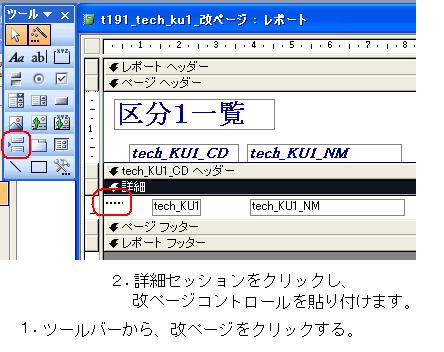
'<準備> レポートデザインで、改ページコントロールを設定する。


Option Compare Database

Option Explicit

'--------------------------------------------------------------

'  指定行数で改ページする

' 1.クラスモジュールの先頭に、行カウンター変数を記述

'--------------------------------------------------------------

Dim intGYO As Integer


'--------------------------------------------------------------

'  指定行数で改ページする

' 2.レポートヘッダーで 改ページコントロールを 不可視にします。

'--------------------------------------------------------------

Private Sub レポートヘッダー_Format(Cancel As Integer, FormatCount As Integer)

    Me.改ページ1.Visible = False


End Sub


'--------------------------------------------------------------

'  指定行数で改ページする

' 3.ページヘッダーで 行カウンターに1をセット。

'--------------------------------------------------------------

Private Sub ページヘッダーセクション_Format(Cancel As Integer, FormatCount As Integer)

    intGYO = 1

End Sub


'--------------------------------------------------------------

'  指定行数で改ページする

' 4.詳細のフォーマット時のイベントで 行カウンター加算、

'   改ページコントロールの制御を行います。

'--------------------------------------------------------------


Private Sub 詳細_Format(Cancel As Integer, FormatCount As Integer)

    intGYO = intGYO + 1


    If intGYO > 3 Then

        Me.改ページ1.Visible = True

    Else

        Me.改ページ1.Visible = False

    End If


End Sub